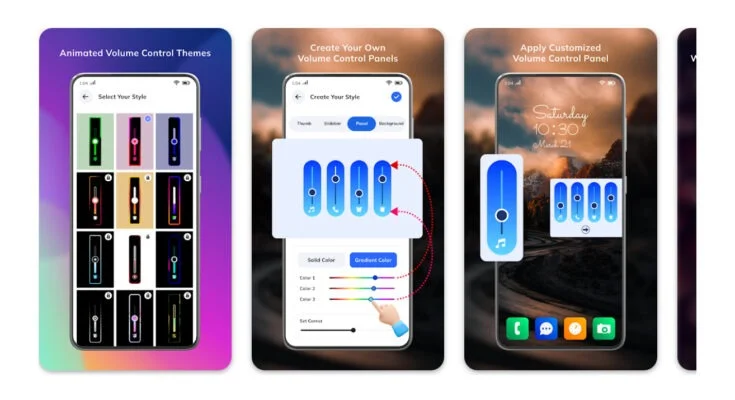
Smartphones come with a built-in volume panel that controls sound levels for calls, media, and notifications. However, many users find the default volume panel boring or limited in functionality. If you want more control and a personalized look, the Volume Styles App is a powerful tool. This app allows you to completely customize your volume panel, from its design and layout to advanced shortcuts. In this guide, you will learn everything about the app, how to use it, and the features that make it worth installing.
What is the Volume Styles App?
The Volume Styles app is an Android customization tool that lets you replace your phone’s default volume panel with a fully customizable one. Instead of the plain slider that comes pre-installed, you can choose from dozens of styles inspired by popular Android skins and even iOS.
With this app, you get options for design, color, position, and even extra buttons. For example, you can add shortcuts to brightness, Bluetooth, and Wi-Fi directly inside the volume panel. This transforms a simple tool into a multi-functional control center.
The app is designed to be lightweight and works smoothly on most Android devices. Unlike system mods or complex launchers, Volume Styles does not require root access. You simply install it and grant the necessary permissions to replace your system’s volume interface.
Key Features of Volume Styles App
Here are the standout features that make this app popular among Android users:
-
Customizable Themes: Choose from more than 40 volume panel designs. Options include iOS style, MIUI, One UI, OxygenOS, and stock Android.
-
Color Options: Change background colors, slider accents, and button tints.
-
Position Control: Place your volume panel on the left, right, or bottom of the screen.
-
Extra Shortcuts: Add quick controls for brightness, Wi-Fi, Bluetooth, rotation lock, and sound profiles.
-
Gesture Support: Some styles allow gestures for faster navigation.
-
Lightweight and Fast: Minimal impact on performance and battery life.
-
Accessibility-Friendly: Works without root and supports most Android devices.
How to Install and Set Up Volume Styles
-
Download the App
Go to the Google Play Store and search for “Volume Styles”. Download and install the app. -
Grant Permissions
The app will ask for accessibility permissions to replace the default volume panel. Grant these to allow customization. -
Choose a Style
Open the app and browse through the available themes. Select the one that matches your preference. -
Adjust Settings
Customize colors, position, and transparency. You can preview changes before applying them. -
Enable Extra Buttons
Add useful shortcuts like brightness or airplane mode to your panel. -
Apply Changes
Once done, press the apply button. Your default volume panel will now be replaced with the customized version.
Pros and Cons of Using Volume Styles
Pros
-
Wide range of customization options.
-
Easy setup without root.
-
Extra controls improve usability.
-
Free version available with many features.
Cons
-
Some advanced themes require in-app purchases.
-
Accessibility permissions may cause minor notification prompts.
-
Works only on Android (not available for iOS).
Why You Should Use Volume Styles
The stock volume panel often feels limited, showing only media or ringtone controls. Volume Styles makes it more functional and visually appealing. Instead of switching through multiple settings menus, you can manage sound, brightness, and connectivity from one panel.
This app is also ideal for those who love to personalize their devices. With themes resembling iOS, MIUI, and One UI, you can give your phone a fresh look that feels premium.
Final Thoughts
The Volume Styles App is one of the best customization tools available for Android users in 2025. It combines style and practicality, letting you design a volume panel that matches your personality while improving functionality.
If you want more than just a plain slider, this app is worth downloading. With a mix of free and premium features, it gives you control over how your volume panel looks and works, without needing root access.
By installing Volume Styles, you can turn a simple function into a powerful tool that enhances your daily smartphone experience.